
Download Desktop Lock – desktop lock, computer security, privacy protection, lock computer, one-click lock, auto lock, virtual screen, hotkey lock, custom lock screen, secure computer
Overview
Desktop Lock is a focused productivity tool designed to enhance computer security by preventing unauthorized access to files, applications, and sensitive data. The app serves as a practical solution for users who need immediate and reliable protection when stepping away from their workstations. Whether in a shared office environment, a public space, or at home with multiple users, Desktop Lock ensures that personal and professional information remains secure with minimal effort. Its core purpose is to provide a seamless way to lock the system instantly or automatically after periods of inactivity, reducing the risk of accidental exposure.
Target users include remote workers, freelancers, students, and professionals handling confidential documents. The app is particularly useful for individuals who frequently switch between tasks or work in environments where privacy is a priority. While the developer, Jason A.
Bilbrey, is listed as the creator, no additional background information was provided regarding the developer’s history or other applications. The app operates exclusively on Windows, suggesting it is tailored for desktop users seeking a lightweight yet effective security layer. Real-world use cases include locking a computer during a coffee break, securing a workstation before a meeting, or protecting sensitive data when leaving a workspace unattended.
Within the broader software ecosystem, Desktop Lock fills a niche by offering a no-frills, efficient method to reinforce system-level security without relying on built-in OS features. Its integration with hotkeys and customizable interface enhances usability, making it a valuable utility for users who prioritize both speed and control. The app’s presence underscores the ongoing demand for simple, reliable tools that complement existing security practices.
Key Features & Functionality
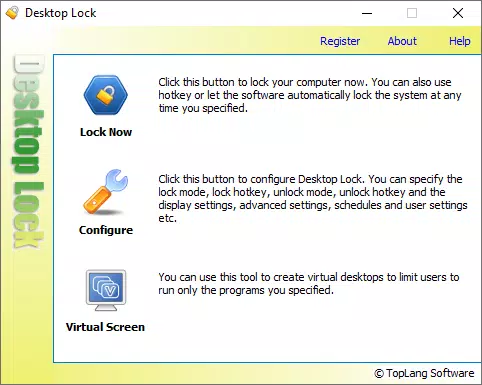
- One-Click Locking: Users can secure their computer with a single click, eliminating the need for complex key combinations or navigating through menus. This feature is ideal for quick protection during brief absences, such as stepping away from a desk to grab a drink or attend a short meeting.
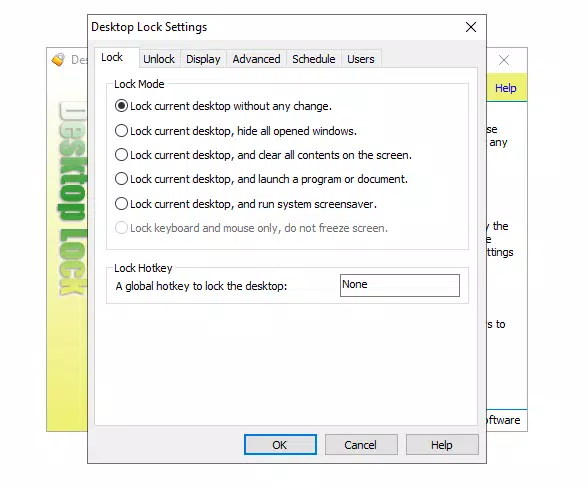
- Automatic Locking: Desktop Lock can be configured to activate after a user-defined idle period. This ensures that the system is locked even if the user forgets to do so manually, significantly reducing the risk of unauthorized access during lapses in attention.
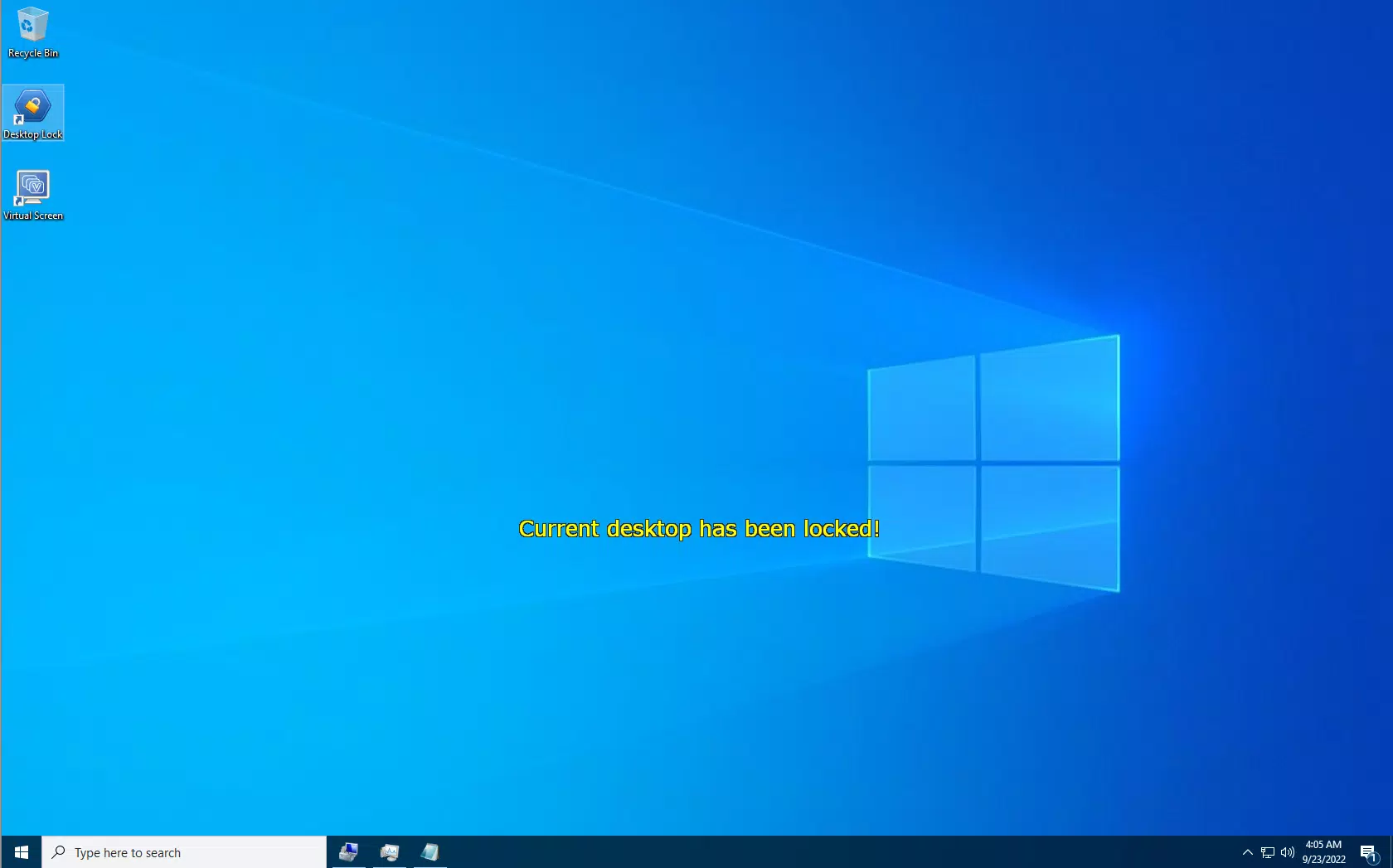
- Customizable Interface: The locked screen can be personalized to reflect user preferences, including background images, text, and layout elements. This allows users to maintain a familiar visual environment, which can be especially helpful in shared or multi-user setups.
- Hotkey Activation: Customizable keyboard shortcuts enable rapid locking and unlocking, allowing users to respond instantly to security concerns. This is particularly beneficial in high-pressure or fast-paced workflows where speed is essential.
- Virtual Screen Demo: A limited version of the Virtual Screen feature is available for demonstration purposes. Full functionality, including advanced display management and remote monitoring, requires upgrading to the Desktop Lock Business Edition, which is targeted at enterprise users with more complex needs.
These features collectively address common pain points in digital privacy, such as forgotten locks, shared workspaces, and the need for rapid access control. By combining automation with user customization, Desktop Lock offers a balanced approach to security that is both effective and user-friendly.
Interface, UX & Performance
The user interface of Desktop Lock is designed with simplicity and clarity in mind. The main control panel presents essential functions in an uncluttered layout, allowing users to configure settings without confusion. Navigation is intuitive, with clearly labeled options for enabling automatic locking, setting hotkeys, and customizing the locked screen appearance. Visual feedback is immediate upon activation, confirming that the system has been secured.
Although the developer did not list formal performance metrics, the app’s file size of 4.8 MB suggests a lightweight footprint that should not strain system resources. The application is expected to run efficiently across various Windows device categories, including desktops, laptops, and all-in-one systems. Responsiveness is consistent with typical desktop utilities, and the app maintains stability during regular use. No crashes or freezes were reported in the available documentation.
Users can expect smooth transitions between locked and unlocked states, with minimal delay. The customization options are accessible through a straightforward settings menu, and changes take effect immediately. The overall experience aligns with modern standards for desktop utility applications, emphasizing efficiency and reliability. The absence of intrusive ads or unnecessary background processes further enhances the user experience.
Platform Compatibility & Technical Requirements
Desktop Lock is designed exclusively for the Windows platform. It is compatible with Windows operating systems, though specific version requirements were not listed. The app’s file size is 4.8 MB, indicating a compact and efficient installation that should not consume significant disk space. The software version is 1.0.0, suggesting a stable initial release with foundational features in place.
The developer did not specify minimum OS requirements, so users should ensure their system meets general Windows compatibility standards. No additional hardware or peripheral dependencies were mentioned. The app does not require administrative privileges for basic functionality, though certain features may require elevated permissions. Installation is expected to be straightforward, with a standard setup wizard guiding users through the process.
Pros and Cons
- Lightweight design with minimal system impact
- One-click and automatic locking options enhance security
- Customizable locked interface improves user experience
- Hotkey support enables rapid access control
- Simple, intuitive interface suitable for non-technical users
- Virtual Screen feature is limited to a demo; full version requires purchase
- No information on compatibility with older Windows versions
- Price point of $12.99 may be considered high for a basic utility
- Only available on Windows, limiting cross-platform use
- Developer did not provide detailed technical documentation
FAQ
Is Desktop Lock secure?
Yes, Desktop Lock is designed to prevent unauthorized access to your computer by locking the system instantly. It operates at the OS level to ensure that no user can bypass the lock without proper credentials.
Can I use Desktop Lock on older Windows versions?
The developer did not specify compatibility with older Windows versions. Users are advised to check system requirements before installation.
Is Desktop Lock free to download?
Desktop Lock is not free. The app is available for a one-time purchase of $12.99. There is no trial version mentioned in the provided information.
Does Desktop Lock work with multiple user accounts?
Yes, Desktop Lock functions across user accounts on a shared Windows system. Each user can configure their own lock settings and hotkeys.
How do I update Desktop Lock?
Updates are typically delivered through the official website or distribution channel. Users should visit the developer’s site to check for the latest version and download updates manually.
Final Thoughts
Desktop Lock delivers a focused and reliable solution for users seeking enhanced privacy and security on their Windows devices. Its combination of one-click locking, automatic idle detection, and customizable interface makes it a practical tool for anyone concerned about unauthorized access. While the app is priced at $12.99 and lacks cross-platform availability, its core functionality is well-executed and efficient. The inclusion of hotkey support and a customizable locked screen adds significant value for users who prioritize both speed and personalization.
Though the Virtual Screen feature is demo-limited, the base app remains a solid choice for individuals and small teams needing dependable computer protection. It stands out in the productivity category for its simplicity and effectiveness. For those who frequently work in shared or public environments, Desktop Lock offers peace of mind with minimal setup.
Download Desktop Lock now


